• Testowanie elementów na płycie głównej HP ProBook x360 11 G3 EE

#1 Testowanie elementów na płycie głównej HP ProBook x360 11 G3 EE


da Bane24 5 gennaio 2026, 11:54
Witam !!!

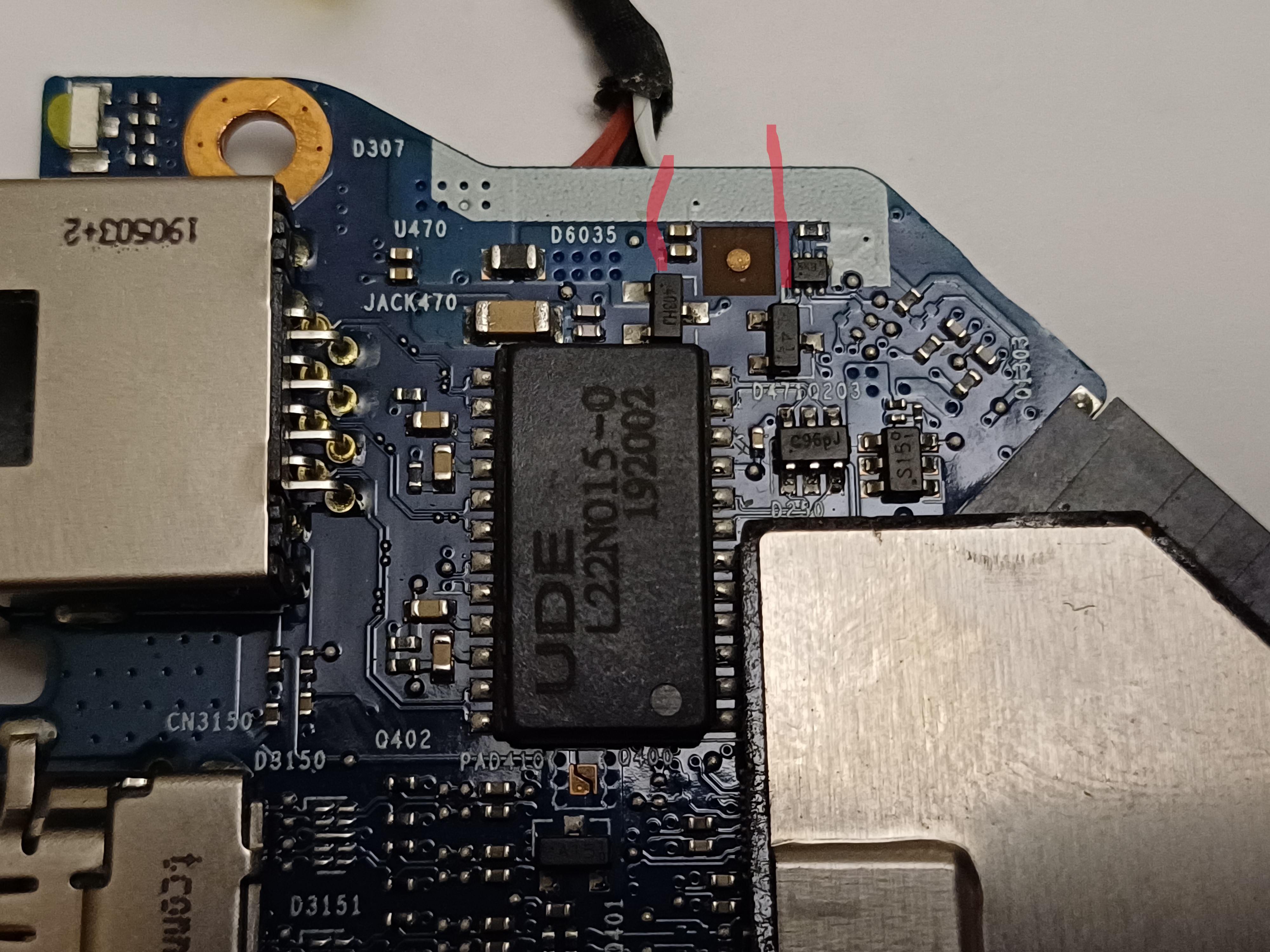
Oto zdjęcie:

Immagine

Oba zaznaczone elementy na zdjęciu to diody. D471 (oznaczenie na obudowie L4) to dioda BAT54, natomiast D6035 (oznaczenie na obudowie 403xx) to dioda TVS AZ4024-02S.

Mam pytanie jak mogę przetestować obie diody,chcę ustalić gdzie znajduje się katoda a gdzie anoda ???


Pozdrawiam Piotr Ko

Re: Testowanie elementów na płycie głównej HP ProBook x360 11 G3 EE


da Google Adsense [BOT] 5 gennaio 2026, 11:54

#3 Re: Testowanie elementów na płycie głównej HP ProBook x360 11 G3 EE


da Bane24 5 gennaio 2026, 14:42
Witam !!!

Dziękuję za zainteresowanie oraz pomoc ale w obu datasheet nie mogę potrzebnych mi informacji. W tym pliku BAT54-Q.pdf udało mi się znaleść potrzebne informację na temat diody BAT54.

Nie mogę znaleźć potrzebnych mi informacji na temat diody TVS AZ4024-02S proszę o pomoc


Pozdrawiam Piotr


Non hai i permessi necessari per visualizzare i file allegati in questo messaggio.

#5 Re: Testowanie elementów na płycie głównej HP ProBook x360 11 G3 EE


da Bane24 5 gennaio 2026, 17:32
Witam !!!

Bardzo dziękuję za pomoc.Uczę się testować diody zarówno pod względem rezystancji (czy nie ma zwarcia) oraz spadku napięcia.Mam pytanie czy podczas testu rezystancji na diodzie ma znaczenie (czerwona sonda na anodzie, czarna na katodzie) która sonda multimetru jest na anodzie a która na katodzie tak jak w przypadku testowania spadku napięcia na diodach.

Pozdrawiam Piotr Ko

#6 Re: Testowanie elementów na płycie głównej HP ProBook x360 11 G3 EE


da matic 5 gennaio 2026, 21:29
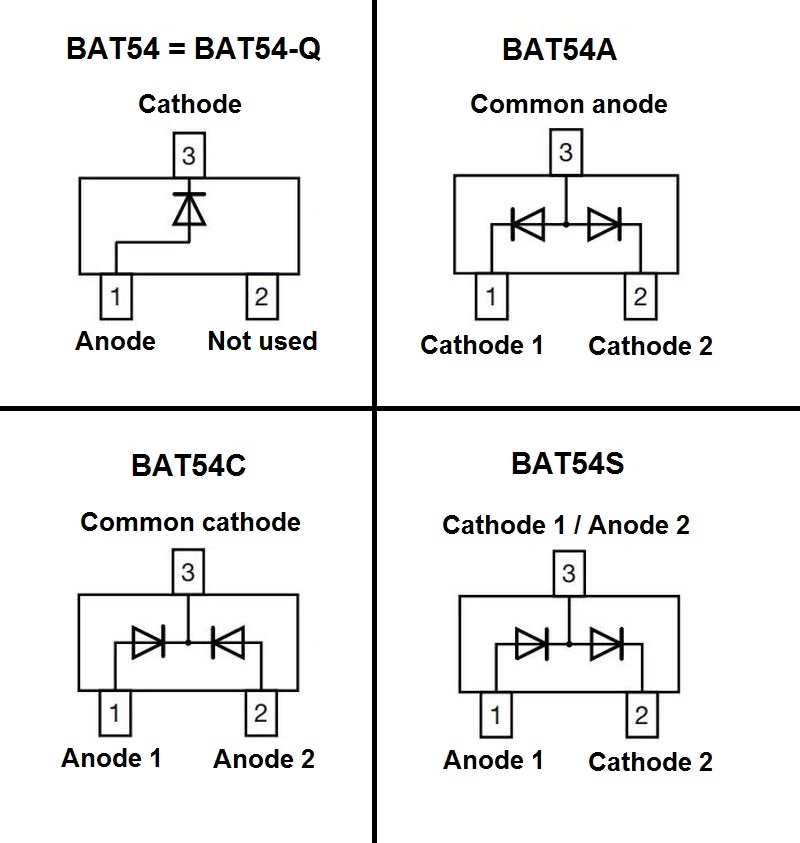
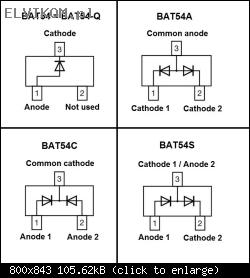
Diodes BAT54 series are a Schottky diodes available at four different configurations - depending on the ending letter. The diode BAT54 (or BAT54-Q) is a single diode in a 3-pin package (one of the pins is not used) while all other configurations -A, -C or -S are double diodes combined in a single package:
Immagine
Regarding the testing, you can use a multimeter at the diode test range. If it is a double configuration diode, test each of the diodes separately:
1) Testing the diode in the forward direction:
Connect the positive (red probe) of the multimeter to the Anode pin, and the negative (black probe) of the multimeter to the Cathode pin of the diode. The multimeter should show a voltage drop of about 0,25V.
2) Testing the diode in the reverse direction:
Now reverse the polarity of the test leads (red probe of the multimeter to the Cathode pin, and the black probe to the Anode pin of the diode). In this case the multimeter should not detect anything - it should display "1." or "OL" (Over Load) depending on the multimeter.

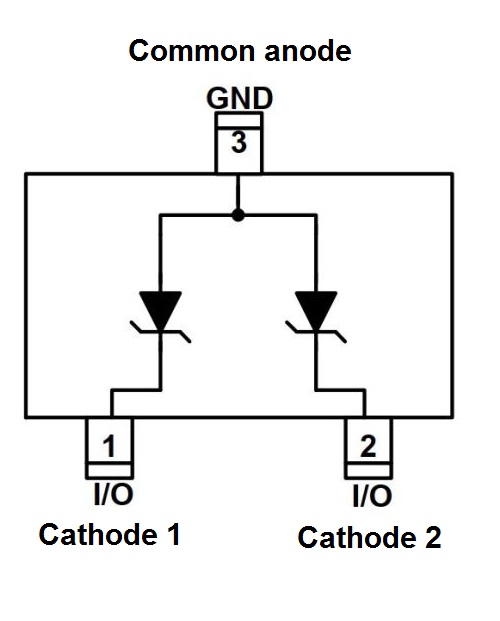
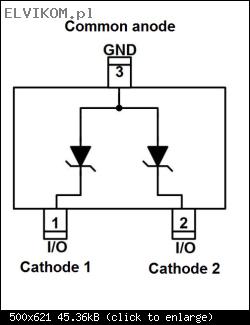
Diode AZ4024-02S is a double Suppressor (ESD, TVS) diodes combined in a single package:
Immagine
Regarding the testing, you can't test this type of diodes with just a multimeter. Perform both tests on each of the built-in diodes.
1) Testing the diode in the forward direction:
Use a multimeter at the diode test range.
Connect the positive (red probe) of the multimeter to the Anode pin, and the negative (black probe) of the multimeter to the Cathode pin of the diode. The multimeter should show a voltage drop of about 0,7V.
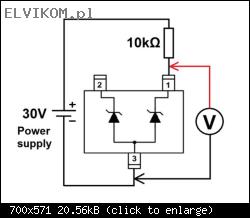
2) Testing the diode in the reverse direction:
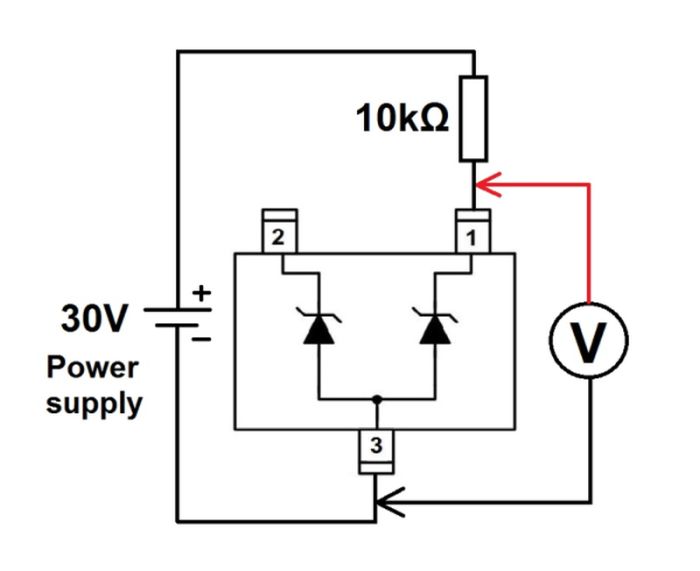
Build a simple circuit as shown in the picture below. You will need a laboratory power supply, a multimeter and a resistor. Set the laboratory power supply to the 30V (or even better 32V, if it allows it) and measure the voltage across the diode. If the diode is fine, you should read a voltage of about 27V.
Immagine

Bane24 ha scritto:Mam pytanie czy podczas testu rezystancji na diodzie ma znaczenie (czerwona sonda na anodzie, czarna na katodzie) która sonda multimetru jest na anodzie a która na katodzie
No, it doesn't matter.
This method of testing is not reliable, as the measurement is very dependant on the diode and also on the multimeter itself. In any case, the resistance must be quite high or even beyond the range of the multimeter at both polarities of the test leads. However, if you measure a low resistance (less than 1kΩ) across the diode with a multimeter in any direction, the diode is definitely damaged.

The best way to test a diode is to perform a voltage drop test in both directions – in the forward as well as reverse orientation of the diode.

#7 Re: Testowanie elementów na płycie głównej HP ProBook x360 11 G3 EE


da Bane24 5 gennaio 2026, 22:27
Witam !!!

Bardzo dziękuję wam obu za pomoc.Chciałym się zapytać jeszcze o 4-kanałową dioda ESD AZC099-04SR7G.Podczas testowania spadku napięcia diodzie AZ4024-02S na otrzymałem dwa razy 0.710 volt przeczytałem w datasheet że jest to dioda 2-Channel.Czy w przypadku diody 4-Channel dioda ESD AZC099-04SR7G powianiem uzyskać spadku napięcia na niej 4 razy ?

Pozdrawiam Piotr Ko

#8 Re: Testowanie elementów na płycie głównej HP ProBook x360 11 G3 EE  [RISOLTO]


da matic 5 gennaio 2026, 23:21
The diode AZC099-04SR7G is a bit different.
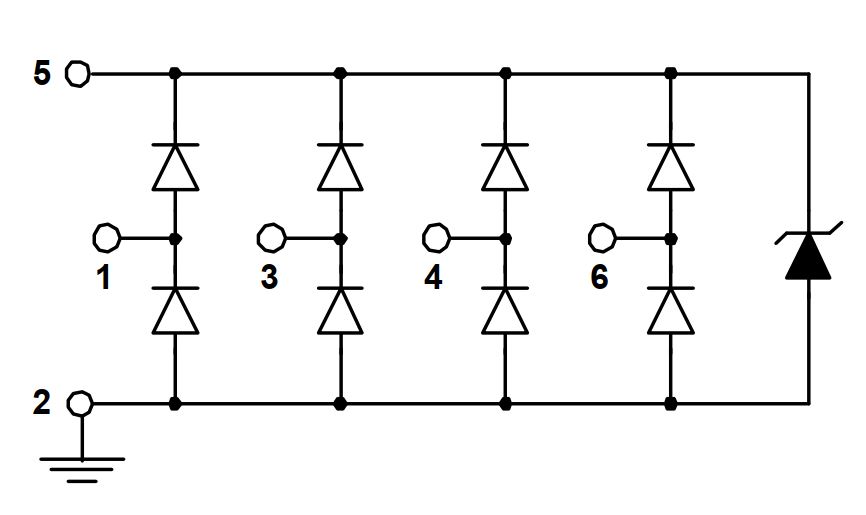
It's build from eight classic diodes and one Suppressor (ESD / TVS) diode:
Immagine
Each of eight diodes should have a forward voltage drop of about 0,5V and no detectable voltage drop in reverse direction.
An additional one ESD diode should have a forward voltage drop of about 0,7V and reversed voltage drop of about 6V measured using the circuit published at post #6.

#9 Re: Testowanie elementów na płycie głównej HP ProBook x360 11 G3 EE


da Bane24 6 gennaio 2026, 10:47
Witam !!!

Dziękuję za pomoc.

Pozdrawiam Piotr Ko

Re: Testowanie elementów na płycie głównej HP ProBook x360 11 G3 EE


da Google Adsense [BOT] 6 gennaio 2026, 10:47

Chi c’è in linea

Visitano il forum: Nessuno e 3 ospiti

_______________________________
Tutti i diritti riservati. È severamente vietata la copia non autorizzata del contenuto di questo sito Web o di qualsiasi sua parte.
Eventuali marchi, nomi di società, prodotti o servizi pubblicati su questo sito Web appartengono ai legittimi proprietari, sono protetti da copyright e utilizzati solo a scopo informativo.