• MSI GF76 11UD MS-15821 - Wyłącza się pod obciążeniem

Pravila foruma:Klikni tukaj za prikaz pravil na forumu

  1. Naslov teme mora vsebovati: proizvajalca naprave, poln model in kratek opis okvare.
  2. Sporočilo teme mora vsebovati: oznako tiskanega vezja (v primeru popravil strojne opreme), razširjen opis okvare, kaj je bilo preverjeno, zamenjano in/ali izmerjeno, sklep in vprašanje. Če ne morete najti oznake tiskanega vezja, morate prebrati TO TEMO. Če še vedno ne najdete oznake, prosim objavite kakovostne fotografije obeh strani matične plošče - potrebno je odstraniti vse folije in module, ki bi lahko zakrivali te oznake.
  3. Pred objavo nove teme, preberite vse teme v podforumu USPOSABLJANJA, in naredite predhodno diagnostiko na podlagi vsebine teh usposabljanj.
  4. Nalaganje celotnih navodil/shem, BIOS / firmware datotek, ali objavljanje povezav, ki vodijo do drugih spletnih strani s takšnimi datotekami, je SROGO PREPOVEDANO. Lahko objavite le majhen del navodil/shem, ali povezavo na BIOS datoteko v podforumu NEVERIFICIRANE DATOTEKE BIOS/EFI. V eni temi ne smete objaviti več kot eno stran navodil/shem. Datoteka ne sme vsebovati vidnih žigov "zaupno",, e-poštnih naslovov ipd.
  5. V eni temi lahko opišete SAMO eno napravo. Za vsako drugo okvarjeno napravo morate odpreti novo temo.
  6. Zahteve za sheme, boardview, fotografije matičnih plošč, datoteke BIOS-a ali servisne priročnike za storitve NISO DOVOLJENE. Če želite vprašati za katero koli od teh, odprite novo temo v podforumu ZAHTEVA ZA DOKUMENTACIJO & DATOTEKO BIOS/EFI.

#1 MSI GF76 11UD MS-15821 - Wyłącza się pod obciążeniem


Napisal/-a gzb90 8 Februar 2026, 15:45
MSI GF76 11UD
Platforma MS-15821 rev 1.2
KBC: KB9548QF2
GPU: RTX 3050 (Było 3050Ti)
CPU: i7-11800H

Laptop został do mnie wysłany z opisem "resetuje się pod obciążeniem GPU - furmark". Jednak nie startował wcale - przebity górny klucz w zasilaniu VRAM. Wymieniłem pamięci, gpu, oba klucze od zasilania VRAM. Zamiast 3050TI, założyłem 3050, poprawiłem vbios - płyta uruchamia się jednak pod obciążeniem się wyłącza. I okazuje się teraz że niekoniecznie musi być to obciążenie GPU, ponieważ uruchamiając w OCCT test "Power" z grafiką zintegrowaną problem również występuje. (zresztą podobne zachowanie zauważyłem jak uruchamiałem płytę bez rdzenia gpu i pamięci z serwisowym radiatorem na CPU, jednak wtedy myślałem że to z powodu małej pojemności cieplnej radiatora sprzęt się po prostu wyłącza). Po wyłączeniu im dłużej odczekamy tym dłużej będzie sprzęt działał.

Co sprawdziłem do tej pory:
- Zrobione pasty i termopady/żel pod radiatorem
- Podczas wyłączenia temperatury rdzenia, core max, gpu itp. nie przekraczają 80 stopni.
- Poprawione wsady BIOS i EC
- Reflow PCH
- Przelutowanie KBC
- Podstawiona inna bateria.
- Nie ma spadku napięcia na głównej linii w momencie wyłączenia komputera (sprawdzone oscyloskopem)

Proszę o sugestie co zmierzyć, co sprawdzić itp. Zastanawiam się nad reballingiem CPU ale chciałbym wykluczyć inne możliwości w drodze pomiarów - jeśli będzie to możliwe ponieważ do płyty nie ma schematu - jest tylko boardview w dodatku z trochę inną obsadą.

Re: MSI GF76 11UD MS-15821 - Wyłącza się pod obciążeniem


Napisal/-a Google Adsense [BOT] 8 Februar 2026, 15:45

#2 Re: MSI GF63 11UD MS-15821 - Wyłącza się pod obciążeniem


Napisal/-a matic 9 Februar 2026, 14:14
Hello!

Does the machine turn off even when it's idle on the desktop? If so, after how much time?

#3 Re: MSI GF63 11UD MS-15821 - Wyłącza się pod obciążeniem


Napisal/-a gzb90 13 Februar 2026, 14:33
Hi matic,

Sorry for delay, I was sick.

Laptop turns off in idle (windows 10 desktop) after 15 minutes. What's weird is the keyboard backlight - it turn off after additional 10 minutes.

On second attempt laptop turn off after 5 minutes, this time keyboard backlight turn off too.

#4 Re: MSI GF63 11UD MS-15821 - Wyłącza się pod obciążeniem


Napisal/-a matic 14 Februar 2026, 13:38
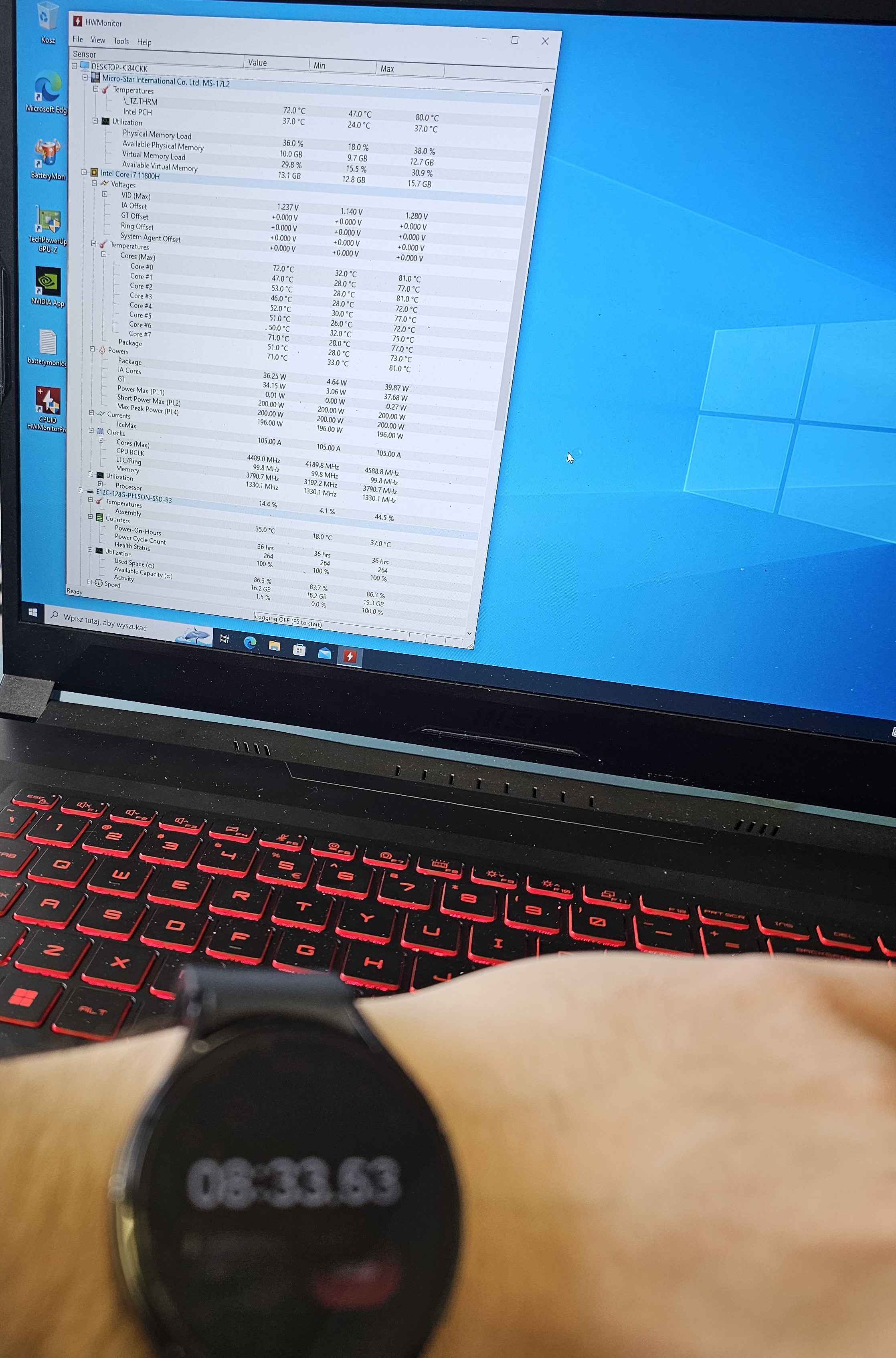
Install a temperature monitoring software, for example CPUID HWMonitor and post a screen of all temperature tabs expanded after about 12 minutes of operation at idle.

#5 Re: MSI GF76 11UD MS-15821 - Wyłącza się pod obciążeniem


Napisal/-a gzb90 15 Februar 2026, 11:46
Slika

Few seconds later "Cores(Max)" temperature ramp to 89 and laptop shuts off.

In your opinion is it look like problem with radiator itself? Maybe lack of gas in heat pipes?

#6 Re: MSI GF76 11UD MS-15821 - Wyłącza się pod obciążeniem


Napisal/-a matic 15 Februar 2026, 14:39
These temperatures are significantly too high for operation at idle.
Yes, the heatpipe may be damaged, otherwise there is something wrong with the temperature sensors readings or fans.

What about the fans - do they spin at high speed just before the laptop shuts down?

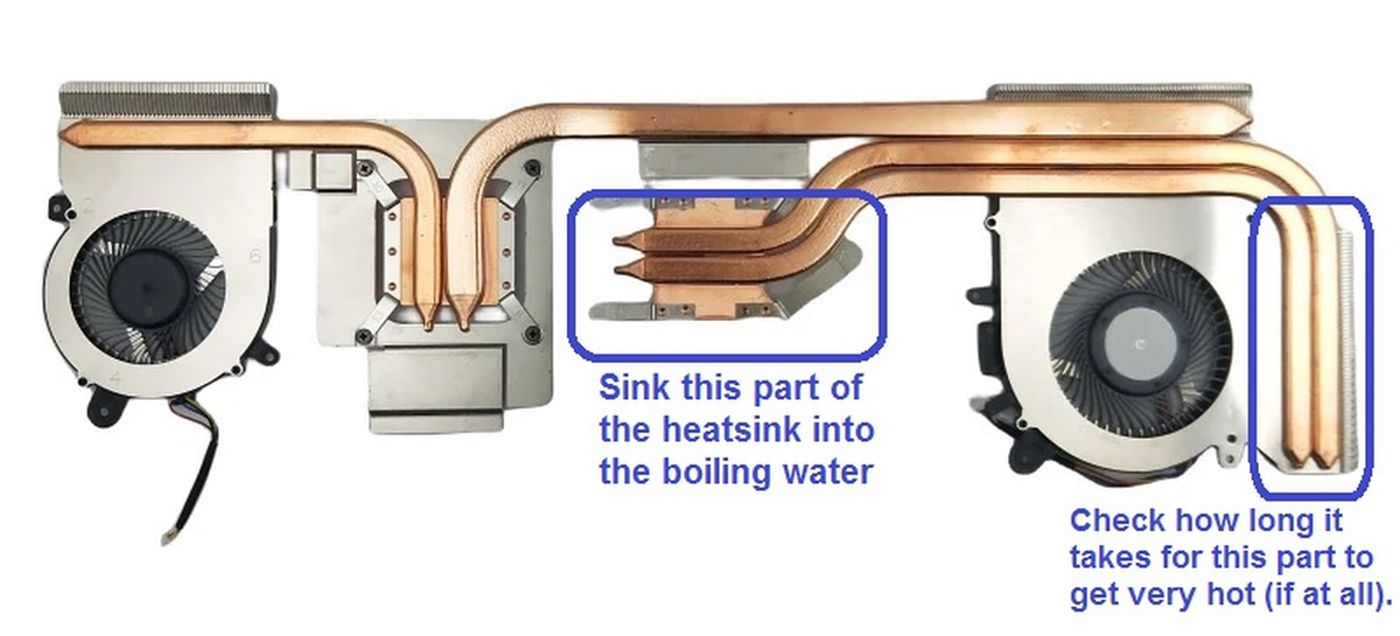
Due to the specific shape of the heatsink, it's a bit difficult to test it with boiling water. Anyway, try doing the boiling water test as described in the following picture.
Slika

#7 Re: MSI GF76 11UD MS-15821 - Wyłącza się pod obciążeniem


Napisal/-a gzb90 16 Februar 2026, 09:53
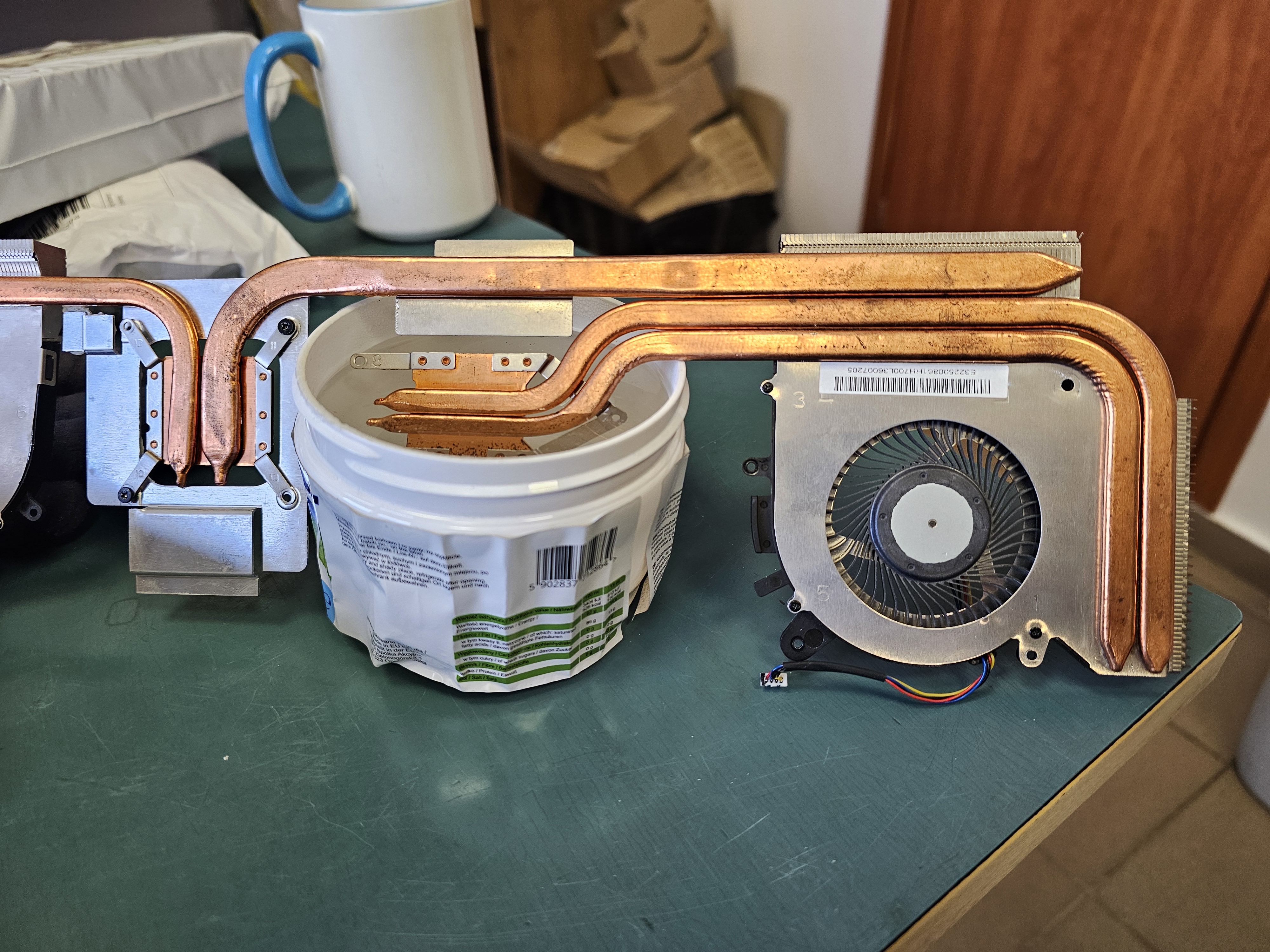
Slika

It's like 30-40 seconds to the right side radiator became untouchable.

Fan spinning is okay, speed is stable. There's no effect of high spinning before shutdown. A moment ago laptop shutdown with temperature around 60 degrees.

Edit:
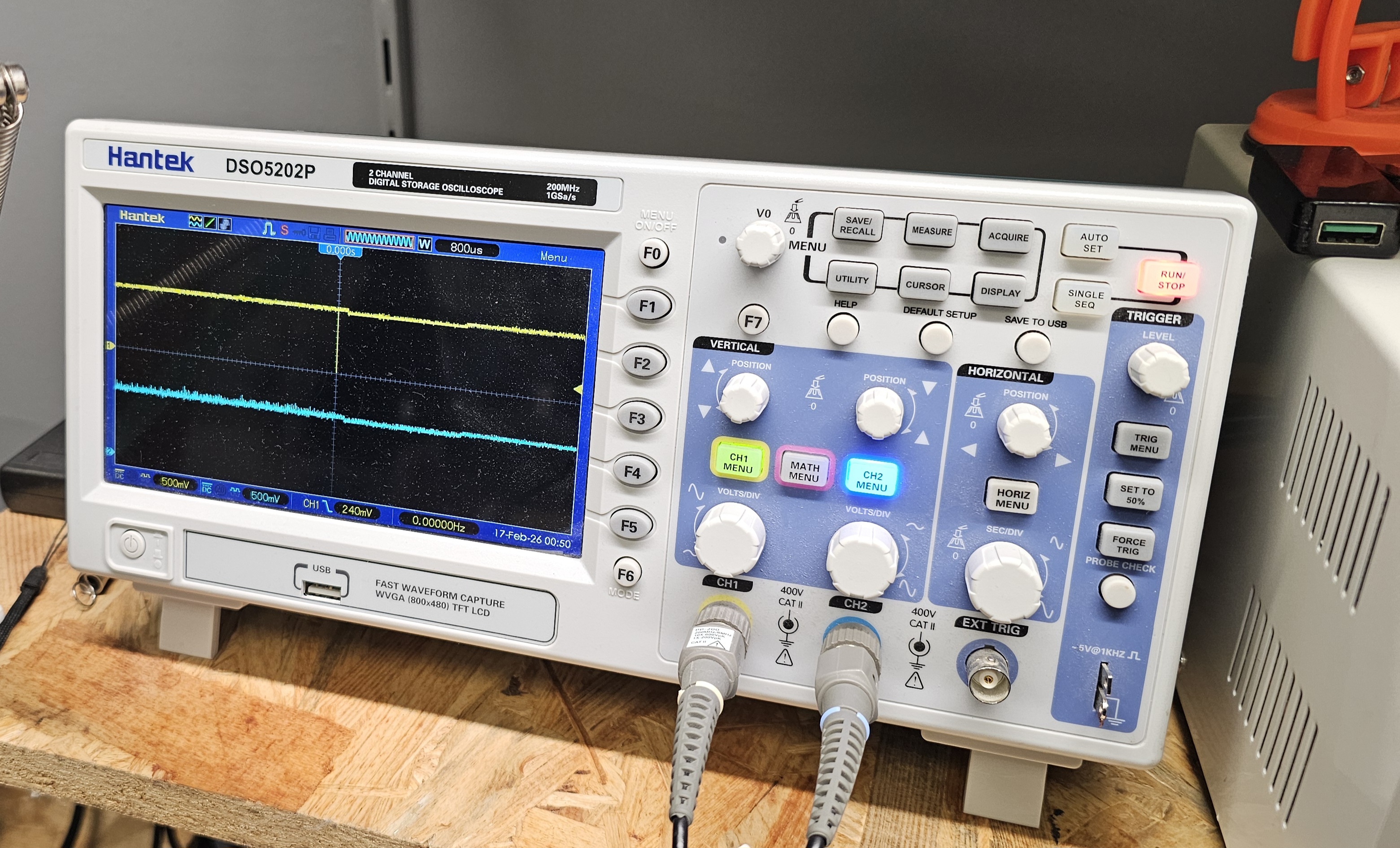
I do some additional test. I measure on 2 channel oscilloscope lines:
1. Yellow: - THERMALTRIP#_R (PCH side R425 of H_THRMTRIP#)
2. Blue: +V1.05U_VCSST (from this voltage H_THRMTRIP# is pulled-up).

In moment of power off there is visible assertion of THERMALTRIP#_R. But for me it looks like more like some noise, shouldn't this signal stay pulled-down once cpu voltages are gone? And core temperature was around 64 degrees this time.
Slika

Do you think it would be safe to remove R425 and pull up H_THRMTRIP# directly from +V1.05U_VCSST for diagnostics purposes?

#8 Re: MSI GF76 11UD MS-15821 - Wyłącza się pod obciążeniem


Napisal/-a matic 17 Februar 2026, 08:36
gzb90 napisal/-a:It's like 30-40 seconds to the right side radiator became untouchable.
The heat pipe is damaged almost for sure (the gas has leaked). Replace the heatsink.

gzb90 napisal/-a:But for me it looks like more like some noise
True, it's not tripped, it's definitely some interference.
If you look closely at the image on the oscilloscope, you can see that the pull-up voltage "+V1.05U_VCCST" also drops slightly at this moment.
gzb90 napisal/-a:shouldn't this signal stay pulled-down once cpu voltages are gone?
The voltage "+V1.05U_VCCST" seems to remain present, when the board shuts down.

gzb90 napisal/-a:Do you think it would be safe to remove R425 and pull up H_THRMTRIP# directly from +V1.05U_VCSST for diagnostics purposes?
It's only safe, if you do this through the additional pull-up resistor, and not directly by shorting this two lines.
But as I said, it seems the pull-up voltage "+V1.05U_VCCST" also drops slightly at this moment, so this will probably not change anything.

I would replace the heatsink first, and then do further diagnostics if necessary.

#9 Re: MSI GF76 11UD MS-15821 - Wyłącza się pod obciążeniem


Napisal/-a gzb90 17 Februar 2026, 11:46
matic napisal/-a:The heat pipe is damaged almost for sure (the gas has leaked). Replace the heatsink.


How long it should take to transfer heat?

matic napisal/-a:The voltage "+V1.05U_VCCST" seems to remain present, when the board shuts down.


It's present because time frame on oscilloscope is to narrow to show voltage fall

matic napisal/-a:True, it's not tripped, it's definitely some interference.
If you look closely at the image on the oscilloscope, you can see that the pull-up voltage "+V1.05U_VCCST" also drops slightly at this moment.


Did you notice this voltage drop to 0V? It's hard to see because it's on the axis.

#10 Re: MSI GF76 11UD MS-15821 - Wyłącza się pod obciążeniem


Napisal/-a matic 17 Februar 2026, 12:10
gzb90 napisal/-a:How long it should take to transfer heat?
Usually about 1-2 seconds, but this heatsink is a bit different, because some of the heat from the GPU is also transferred to the CPU side.
You can repeat the boiling water test, but this time immerse both - the CPU and the GPU part into the boiling water and observe how long it takes for the heat to transfer to the far right side.
If it still take more than 4 seconds, the heat pipe is definitely damaged.

gzb90 napisal/-a:Did you notice this voltage drop to 0V? It's hard to see because it's on the axis.
You're right, I see it now.

Bypassing the temperature protection may cause the CPU/GPU overheating which may cause it's failure.

Re: MSI GF76 11UD MS-15821 - Wyłącza się pod obciążeniem


Napisal/-a Google Adsense [BOT] 17 Februar 2026, 12:10

Kdo je na strani

Po forumu brska: 0 registriranih uporabnikov in 7 gostov

_______________________________
Vse pravice pridržane. Nepooblaščeno kopiranje vsebine te spletne strani ali njenega dela je strogo prepovedano.
Vse blagovne znamke, izdelki ali storitve, objavljene na tej spletni strani, pripadajo njihovim zakonitim lastnikom, so avtorsko zaščitene in se uporabljajo samo v informativne namene.