• Lenovo IdeaPad 320-15ABR DG526 DG527 DG726 NMB341 Rev:1.0 No screen

Правила форуму:Натисніть тут для перегляду правил форуму

  1. Назва теми має містити: виробника пристрою, повну модель та короткий опис проблеми.
  2. Пост має містити: код маркування друкованої плати (необхідний у разі ремонту обладнання), розширений опис проблеми, речі, які ви перевірили/замінили/виміряли, ваші висновки та запитання. Якщо ви не можете знайти код маркування друкованої плати, прочитайте ЦЮ ТЕМУ. Якщо ви все ще не можете знайти маркування друкованої плати, завантажте фотографії з високою роздільною здатністю обох сторін друкованої плати - необхідно видалити всі плівки, модулі або кронштейни, які можуть покривати ці позначки.
  3. Перш ніж публікувати нову тему, прочитайте всі теми підфоруму НАВЧАННІ і проведіте попередню діагностику на основі змісту цих тренінгів.
  4. Завантаження будь-яких повних схем, бордвю, файлів БІОС / прошивки або будь-якої іншої документації (або посилань на веб-сайти з такими файлами) СТРОГО ЗАБОРОНЕНО. Ви можете опублікувати лише невелику частину документації або посилання на файл БІОС на підфорумі НЕПЕРЕВІРЕНІ ФАЙЛИ БІОС що спростити діагностику або ремонт. Вам не дозволяється публікувати більше однієї повної сторінки інструкції/схеми на одну тему. Файл, який ви публікуєте, не повинен містити водяних знаків, «конфіденційних» тегів, посилань чи адрес електронної пошти та не може бути захищений паролем.
  5. Дозволено описувати лише один несправний пристрій у одній темі - ви завжди повинні відкривати нову тему для кожного наступного пристрою.
  6. Запит повних схем, бордвю, файлів БІОС або будь-якої іншої документації ЗАБОРОНЕНО на цьому підфорумі. Якщо вам потрібно попросити щось із цього, вам слід відкрити нову тему в підфорумі ЗАПИТ НА ДОКУМЕНТАЦІЮ ТА БІОС.
Ця тема позначена як АРХІВНИЙ. Відповідайте лише в тому випадку, якщо ваша відповідь містить рішення проблеми (Правила Форуму, п. 12.1).

#1 Lenovo IdeaPad 320-15ABR DG526 DG527 DG726 NMB341 Rev:1.0 No screen


Amir 16 Серпня 2023, 06:35
hi to all
Lenovo IdeaPad 320-15ABR
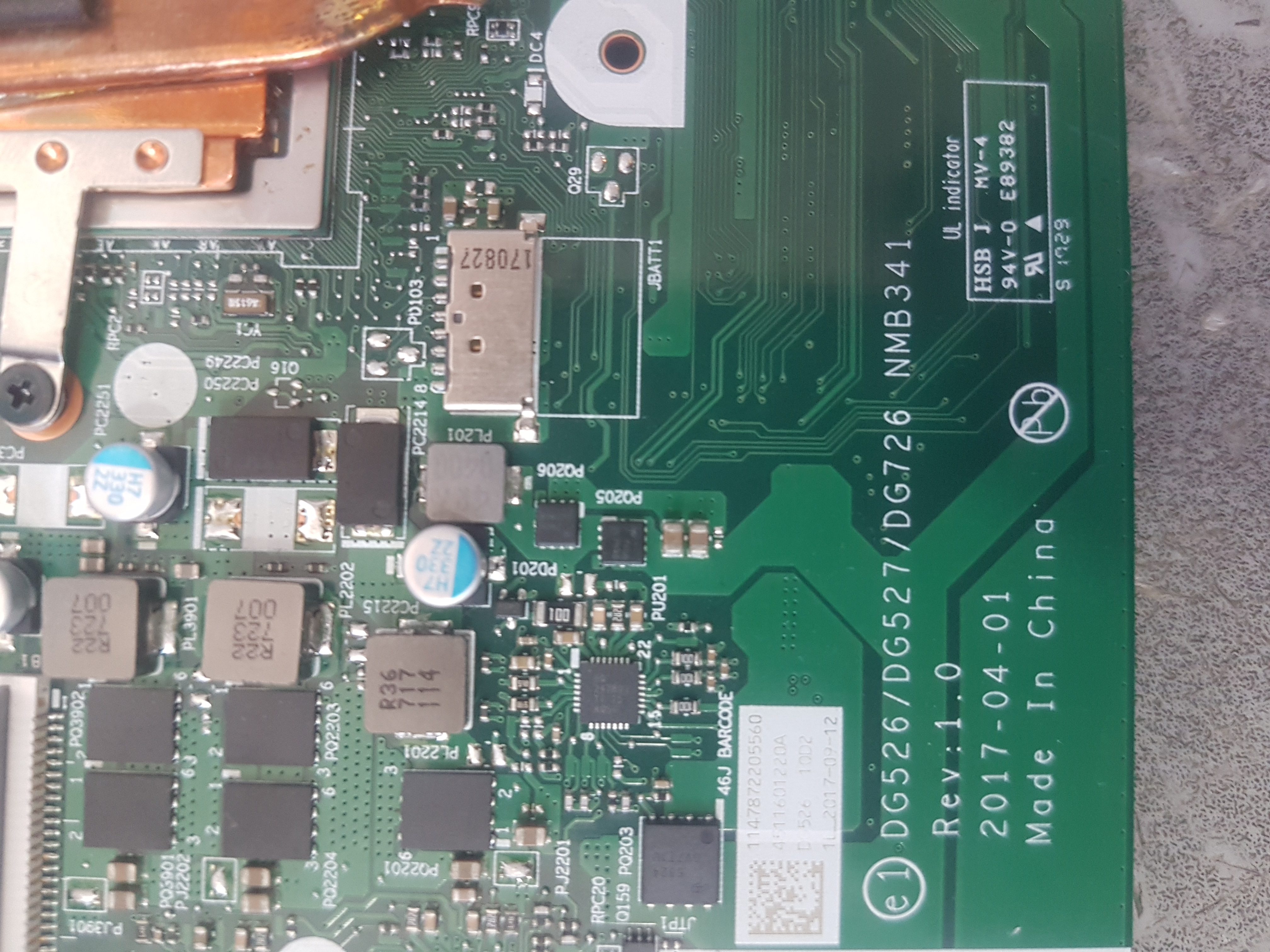
motherboard part no : DG526 DG527 DG726 NMB341 Rev:1.0
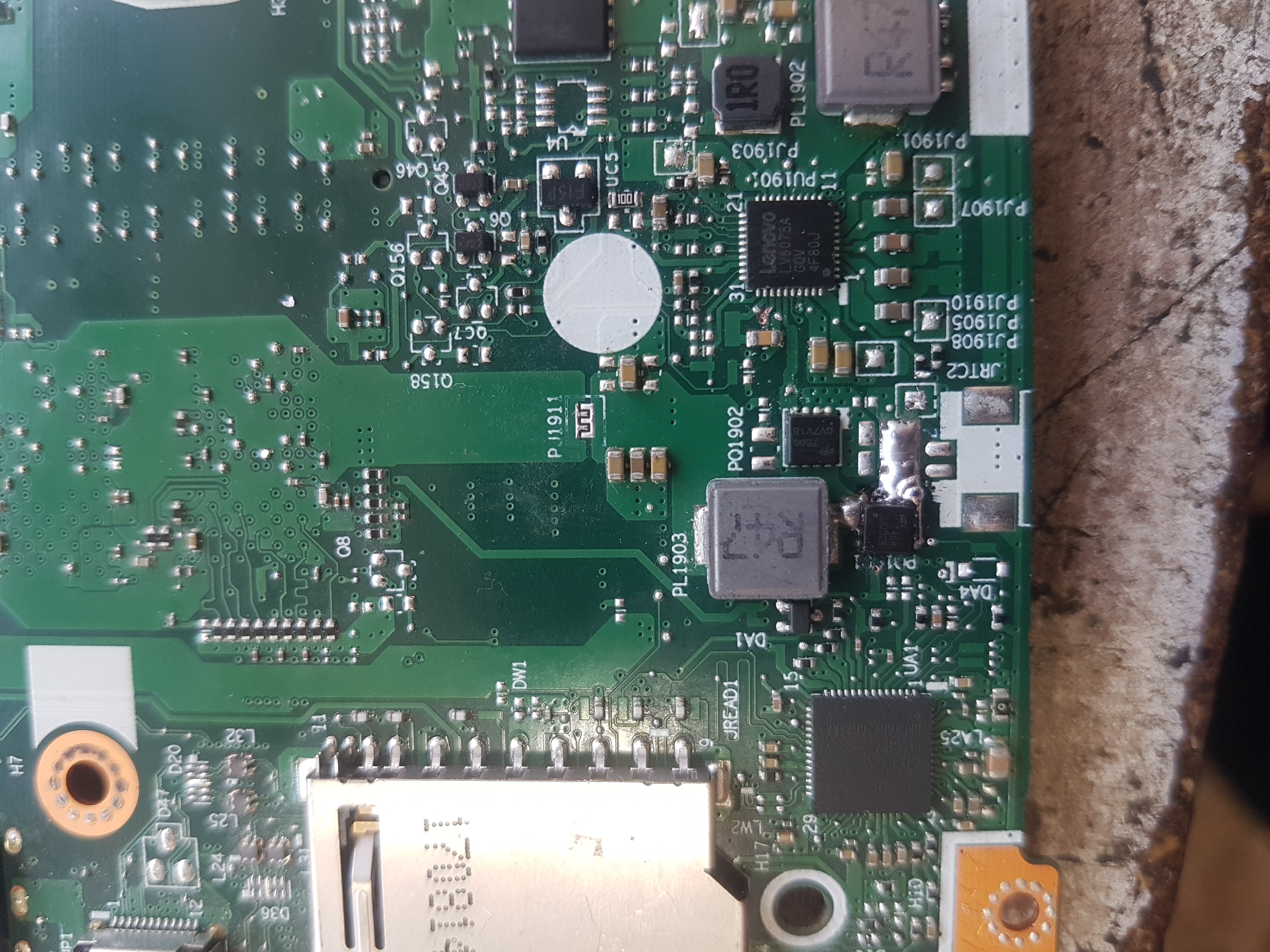
PQ1901 damaged (The pad is damaged)and after replacing 1.2 is ok. seems that all main coil voltage is ok.
PQ1901 pin 1-3 to pin 4 resistance is low.
in JDDR no voltage 1.2 in pin 124-118-112-129-123.......please advise me more test point
tnx

Re: Lenovo IdeaPad 320-15ABR DG526 DG527 DG726 NMB341 Rev:1.0 No screen


Google Adsense [BOT] 16 Серпня 2023, 06:35

#2 Re: Lenovo IdeaPad 320-15ABR DG526 DG527 DG726 NMB341 Rev:1.0 No screen


matic 16 Серпня 2023, 07:08
Hello!

Measure the resistances between listed pins of chip PU1901:
- Between pin 27 and pin 35.
- Between pin 32 and pin 33.
- Between pin 33 and pin 34.
- Measure the resistance to ground on pin 35.

- Measure the resistance to ground on coil PL1903.

#3 Re: Lenovo IdeaPad 320-15ABR DG526 DG527 DG726 NMB341 Rev:1.0 No screen


Amir 16 Серпня 2023, 07:32
hello

pin27 to 35=about 138k
pin32 to 33= 380k
pin33 to 34= 40 ohm
35 to gnd= 8 meg
pl1903 to gnd =about 3.5 meg

#4 Re: Lenovo IdeaPad 320-15ABR DG526 DG527 DG726 NMB341 Rev:1.0 No screen


matic 16 Серпня 2023, 07:39
Amir написав:pin33 to 34= 40 ohm
This resistance seems too low.

Measure the voltage to ground on pin 31 of chip PU1901.

Amir написав:pl1903 to gnd =about 3.5 meg
Is this measurement correct?
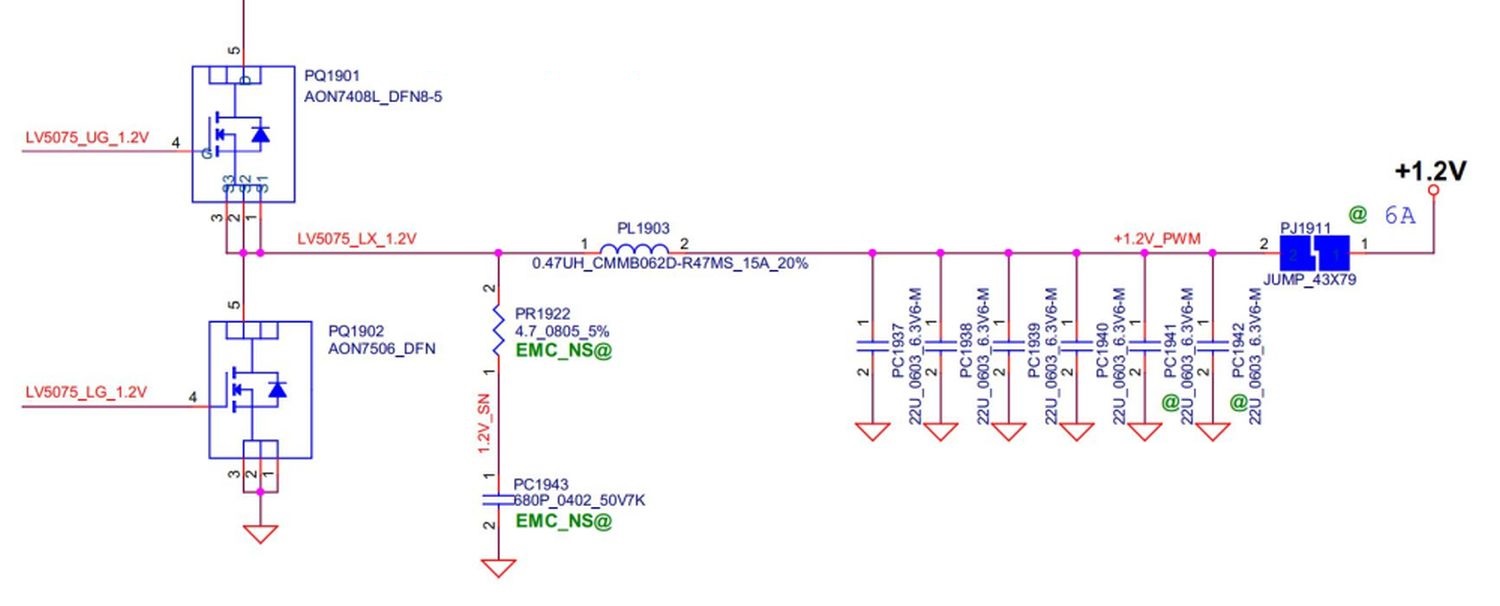
Did you measure with the jumper PJ1911 closed?

#5 Re: Lenovo IdeaPad 320-15ABR DG526 DG527 DG726 NMB341 Rev:1.0 No screen


Amir 16 Серпня 2023, 07:55
sorry about 13 k
pj1911 is normally open
"Measure the voltage to ground on pin 31 of chip PU1901."
in standby or power on?
Зображення
update:pin 31= 3.5v in power off
pl1903 voltage is 0.925v power off

#6 Re: Lenovo IdeaPad 320-15ABR DG526 DG527 DG726 NMB341 Rev:1.0 No screen


matic 16 Серпня 2023, 10:01
Amir написав:sorry about 13 k
pj1911 is normally open
Please, measure this resistance again this time with the jumper closed.

Amir написав:in standby or power on?
When the machine is turned on.

Amir написав:update:pin 31= 3.5v in power off
This voltage should be 0V, when the machine is turned off.

#7 Re: Lenovo IdeaPad 320-15ABR DG526 DG527 DG726 NMB341 Rev:1.0 No screen


Amir 17 Серпня 2023, 15:21
hi
sorry for mistake
pin31 in on =3.5 v off=0v
other side of pj1911 is GND
pl1903 in standby =1v
without ram =0.5v
with ram= 0.2 v

#8 Re: Lenovo IdeaPad 320-15ABR DG526 DG527 DG726 NMB341 Rev:1.0 No screen


matic 17 Серпня 2023, 18:13
Amir написав:other side of pj1911 is GND
And it shouldn't be.
Perform a short circuit test.
The APU processor and the OnBoard RAM memory chips are very likely damaged.

Amir написав:pl1903 in standby =1v
In St-by it should be 0V.

#9 Re: Lenovo IdeaPad 320-15ABR DG526 DG527 DG726 NMB341 Rev:1.0 No screen


Amir 18 Серпня 2023, 09:08
tnx matic
here is motherboard part number. The device does not have a label just idea pad320.if other side of jp1911 is not GNd Why is the jumper not closed?
Зображення

#10 Re: Lenovo IdeaPad 320-15ABR DG526 DG527 DG726 NMB341 Rev:1.0 No screen


matic 18 Серпня 2023, 12:21
I think we don't understand each other...

Please, measure the resistance to ground on the system side of the jumper PJ1911 (the side marked with an arrow).
Зображення

#11 Re: Lenovo IdeaPad 320-15ABR DG526 DG527 DG726 NMB341 Rev:1.0 No screen


Amir 19 Серпня 2023, 06:06
GND i said before.
The jumper is normally open from the beginning

#12 Re: Lenovo IdeaPad 320-15ABR DG526 DG527 DG726 NMB341 Rev:1.0 No screen


matic 19 Серпня 2023, 08:52
Amir написав:GND i said before.
It shouldn't be. Perform a short circuit test as suggested.
Зображення

Amir написав:The jumper is normally open from the beginning
It shouldn't be. Maybe someone previously repaired this board and left this jumper open. It should be normally closed for sure.

#13 Re: Lenovo IdeaPad 320-15ABR DG526 DG527 DG726 NMB341 Rev:1.0 No screen


Amir 19 Серпня 2023, 14:38
I think I was the first person to open the device. I think the jumper was opened due to high current. With the short circuit test, UD3 and UD4 seem to be hot.

Is there a way to disable onboard ram?

#14 Re: Lenovo IdeaPad 320-15ABR DG526 DG527 DG726 NMB341 Rev:1.0 No screen


matic 19 Серпня 2023, 15:07
Amir написав:I think I was the first person to open the device. I think the jumper was opened due to high current.
Considering the white silkscreen printing around this jumper seems worn, I don't think that's the case.

Amir написав:With the short circuit test, UD3 and UD4 seem to be hot.
Remove both chips from the board and remeasure the resistance to ground on the system side of jumper PJ1911.

Unfortunately, there is a very high possibility that all the RAM chips are damaged and the RAM memory controller inside the APU processor as well.

Amir написав:Is there a way to disable onboard ram?
I'm not sure, but I think there is no such a way as there is no description of "RAM strap" resistors in the schematic.

#15 Re: Lenovo IdeaPad 320-15ABR DG526 DG527 DG726 NMB341 Rev:1.0 No screen


Amir 19 Серпня 2023, 15:55
you are right matic .the device opened before
can edit bios for disable ram?

#16 Re: Lenovo IdeaPad 320-15ABR DG526 DG527 DG726 NMB341 Rev:1.0 No screen


matic 20 Серпня 2023, 10:35
Amir написав:can edit bios for disable ram?
No, as far as I know there is no such an option.

By the way, in case of a short circuit to ground on the RAM power supply rail it must be resolved in any case - it's impossible to disable the OnBoard RAM in case of a short circuit.

Re: Lenovo IdeaPad 320-15ABR DG526 DG527 DG726 NMB341 Rev:1.0 No screen


Google Adsense [BOT] 20 Серпня 2023, 10:35
Ця тема позначена як АРХІВНИЙ. Відповідайте лише в тому випадку, якщо ваша відповідь містить рішення проблеми (Правила Форуму, п. 12.1).

Хто зараз онлайн

Зараз переглядають цей форум: Немає зареєстрованих користувачів і 7 гостей

_______________________________
Всі права захищені. Заборонено копіювати будь-який вміст та елементи веб-сайту без дозволу.
Усі торгові марки, назви брендів, продукти чи послуги, опубліковані на цьому веб-сайті, належать їхнім законним власникам і використовувались лише в інформаційних цілях.