• Acer SP314-51-53XS does not illuminate the screen

Pravila foruma:Klikni tukaj za prikaz pravil na forumu

  1. Naslov teme mora vsebovati: proizvajalca naprave, poln model in kratek opis okvare.
  2. Sporočilo teme mora vsebovati: oznako tiskanega vezja (v primeru popravil strojne opreme), razširjen opis okvare, kaj je bilo preverjeno, zamenjano in/ali izmerjeno, sklep in vprašanje. Če ne morete najti oznake tiskanega vezja, morate prebrati TO TEMO. Če še vedno ne najdete oznake, prosim objavite kakovostne fotografije obeh strani matične plošče - potrebno je odstraniti vse folije in module, ki bi lahko zakrivali te oznake.
  3. Pred objavo nove teme, preberite vse teme v podforumu USPOSABLJANJA, in naredite predhodno diagnostiko na podlagi vsebine teh usposabljanj.
  4. Nalaganje celotnih navodil/shem, BIOS / firmware datotek, ali objavljanje povezav, ki vodijo do drugih spletnih strani s takšnimi datotekami, je SROGO PREPOVEDANO. Lahko objavite le majhen del navodil/shem, ali povezavo na BIOS datoteko v podforumu NEVERIFICIRANE DATOTEKE BIOS/EFI. V eni temi ne smete objaviti več kot eno stran navodil/shem. Datoteka ne sme vsebovati vidnih žigov "zaupno",, e-poštnih naslovov ipd.
  5. V eni temi lahko opišete SAMO eno napravo. Za vsako drugo okvarjeno napravo morate odpreti novo temo.
  6. Zahteve za sheme, boardview, fotografije matičnih plošč, datoteke BIOS-a ali servisne priročnike za storitve NISO DOVOLJENE. Če želite vprašati za katero koli od teh, odprite novo temo v podforumu ZAHTEVA ZA DOKUMENTACIJO & DATOTEKO BIOS/EFI.
Ta tema je označena kot ARHIVSKA. Odgovorite samo, če vaše sporočilo vsebuje rešitev (Pravila in Pogoji, 12.1).

#1 Acer SP314-51-53XS does not illuminate the screen


Napisal/-a Jmac 30 Marec 2023, 10:41
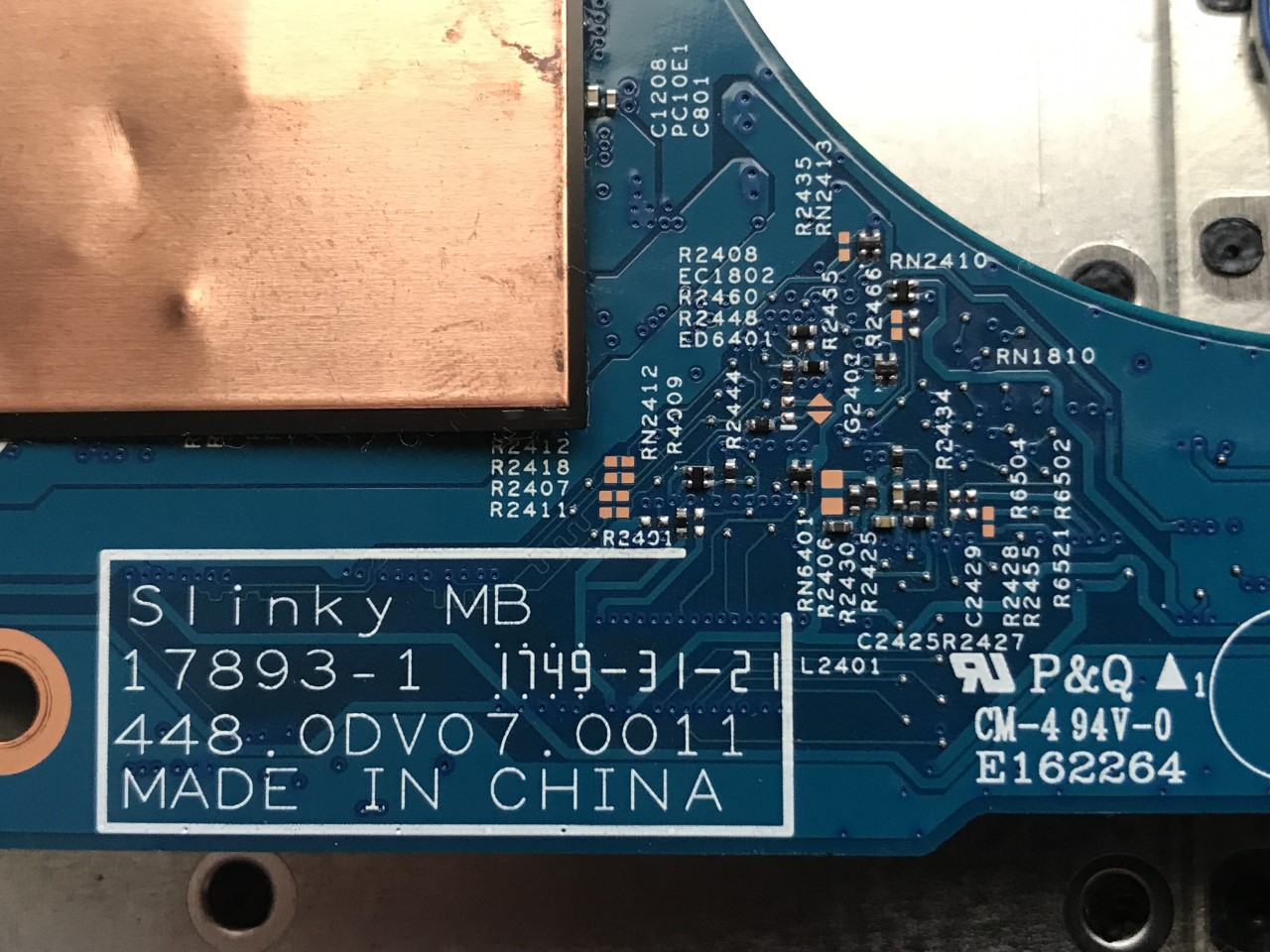
MB I attach a photo
Slika
Laptop does not turn on the screen, but through HDMI it works.
In principle, the PCB connector to the display was in poor condition.
After replacing and verifying that there is no loose pin or short circuit.

Re: Acer SP314-51-53XS does not illuminate the screen


Napisal/-a Google Adsense [BOT] 30 Marec 2023, 10:41

#2 Re: Acer SP314-51-53XS does not illuminate the screen


Napisal/-a matic 30 Marec 2023, 13:29
Hello!

Illuminate the internal LCD screen (matrix) with an external light source and check, if the picture is visible.

#3 Re: Acer SP314-51-53XS does not illuminate the screen


Napisal/-a Jmac 19 April 2023, 10:33
The picture is not visible. No backlight.

#5 Re: Acer SP314-51-53XS does not illuminate the screen


Napisal/-a Jmac 20 April 2023, 10:10
1- 12V
5- 0V
6- 0V
20- 0V
21- 3.3V

#7 Re: Acer SP314-51-53XS does not illuminate the screen


Napisal/-a matic 20 April 2023, 18:20
Measure the voltages to ground on pins 1, 4, 8 of transistors PU4301, PU4401.

#8 Re: Acer SP314-51-53XS does not illuminate the screen


Napisal/-a Jmac 21 April 2023, 09:45
Machine
0V Pin 122 KBC

matic
PU4401
1- 12V
4- 12V
8- 0V

PU4301
1, 4, 8- 0V

#9 Re: Acer SP314-51-53XS does not illuminate the screen


Napisal/-a matic 21 April 2023, 11:39
Jmac napisal/-a:matic
PU4401
1- 12V
4- 12V
8- 0V

PU4301
1, 4, 8- 0V
Please, repeat the measurements with the power supply connected to the board.

#10 Re: Acer SP314-51-53XS does not illuminate the screen


Napisal/-a Jmac 22 April 2023, 11:15
PU4401 PU4301

1- 18.93V 19.9V
4- 1.72V 6.3V
8- 18.91V 19.9V

#11 Re: Acer SP314-51-53XS does not illuminate the screen


Napisal/-a matic 23 April 2023, 18:33
Remeasure the voltages to ground on pins 1, 5, 6, 19, 21, 25, 28, 29 of LVDS connector EDP1 when the machine is turned on with the internal matrix and the power supply connected to the board.

#12 Re: Acer SP314-51-53XS does not illuminate the screen


Napisal/-a Jmac 25 April 2023, 10:59
Thank you very much Matic,
1- 11,75
5- 0
6- 0
19- 0
21- 3.3
25- 0
28- 2.2
29- 2.3

#13 Re: Acer SP314-51-53XS does not illuminate the screen


Napisal/-a matic 25 April 2023, 11:51
Measure the voltages to ground on both pins of fuse F5501 when the machine is turned on with the internal matrix and the power supply connected to the board.

#14 Re: Acer SP314-51-53XS does not illuminate the screen


Napisal/-a Jmac 28 April 2023, 10:52
18.7V on both sides.

#15 Re: Acer SP314-51-53XS does not illuminate the screen


Napisal/-a matic 28 April 2023, 14:35
Jmac napisal/-a:1- 11,75
Jmac napisal/-a:18.7V on both sides.
The fuse F5501 is directly connected to pin 1 of the EDP1 connector, but you have different voltages on these two pins. How is this possible unless the copper path on the board os broken, which is quite unlikely?

#16 Re: Acer SP314-51-53XS does not illuminate the screen


Napisal/-a Jmac 29 April 2023, 09:02
The voltage of 11.75V was taken only with the battery and I have verified the same voltage in the F5501.
With feeder, if the values indicated in F5501 correspond to pin 1, it is 18.7V

#17 Re: Acer SP314-51-53XS does not illuminate the screen


Napisal/-a matic 30 April 2023, 12:50
Set your multimeter to the diode test mode and measure the voltage drops to ground on pins 5, 6, 12, 13, 14, 16, 17, 25, 26, 28, 29, 40 of LVDS connector EDP1 with the matrix disconnected from the board.

#18 Re: Acer SP314-51-53XS does not illuminate the screen


Napisal/-a Jmac 3 Maj 2023, 10:29
5- 0.79
6- 1.14
12- 0.7
13- 0.69
14- 0.65
16- 0.002
17- OL
25- 1.11
26- 0.082
28- 0.56
29- 0.57
40- OL

#19 Re: Acer SP314-51-53XS does not illuminate the screen


Napisal/-a matic 3 Maj 2023, 12:43
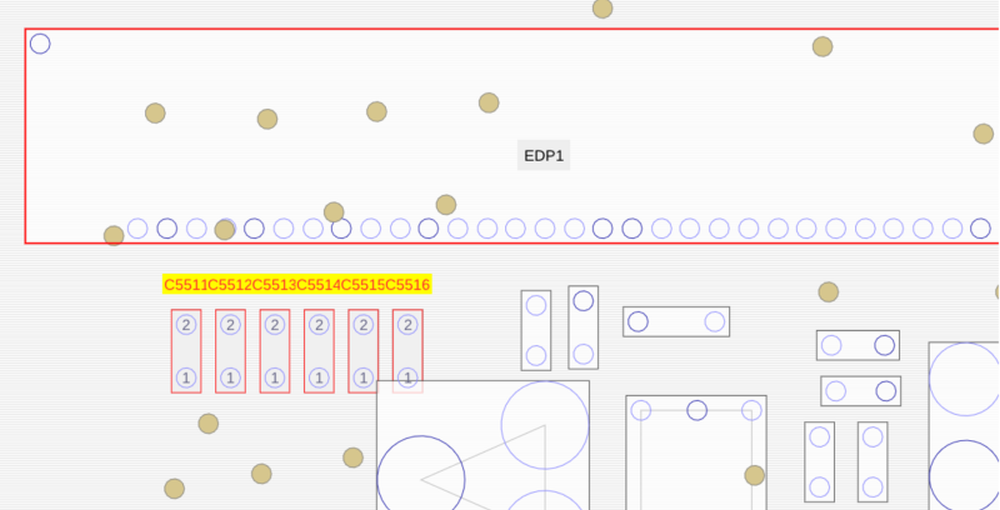
Also measure the voltage drops to ground on pin 1 of capacitors C5511, C5512, C5513, C5514, C5515, C5516 with a multimeter on the diode test mode.
Slika

#20 Re: Acer SP314-51-53XS does not illuminate the screen


Napisal/-a Jmac 4 Maj 2023, 09:25
C5511- 0.41
C5512- 0.34
C5513- 0.41
C5514- 0.37
C5515- 0.42
C5516- 0.39

Re: Acer SP314-51-53XS does not illuminate the screen


Napisal/-a Google Adsense [BOT] 4 Maj 2023, 09:25
Ta tema je označena kot ARHIVSKA. Odgovorite samo, če vaše sporočilo vsebuje rešitev (Pravila in Pogoji, 12.1).
Kdo je na strani

Po forumu brska: 0 registriranih uporabnikov in 10 gostov

_______________________________
Vse pravice pridržane. Nepooblaščeno kopiranje vsebine te spletne strani ali njenega dela je strogo prepovedano.
Vse blagovne znamke, izdelki ali storitve, objavljene na tej spletni strani, pripadajo njihovim zakonitim lastnikom, so avtorsko zaščitene in se uporabljajo samo v informativne namene.