• HP 15-n027sa DA0U92MB6D0 not detecting charger / doesn't turn on

Zasady działu:Kliknij, aby przejrzeć zasady tego działu

  1. Tytuł wątku powinien zawierać markę i pełny model sprzętu oraz skrótowy opis usterki.
  2. Treść wątku powinna zawierać dokładny opis usterki, co zostało sprawdzone/wymienione/zmierzone, wyniki tych działań, oznaczenie kodowe PCB (w przypadku napraw hardware) oraz sformułowane pytanie. W przypadku problemów z odczytaniem oznaczenia kodowego PCB, należy przeczytać TEN WĄTEK. Jeśli nadal nie można znaleźć oznaczenia, należy zamieścić wyraźne zdjęcia obu stron płyty - należy przy tym usunąć wszelkie folie i moduły, mogące ewentualnie zasłaniać oznaczenia płyty.
  3. Przed napisaniem nowego tematu, każdy użytkownik zobowiązany jest zapoznać się z wątkami w dziale SZKOLENIA i na ich podstawie dokonać próby wstępnej diagnostyki uszkodzenia.
  4. Nie jest dozwolone umieszczanie załączników w postaci kompletnych dokumentacji, a także jakichkolwiek wsadów BIOS / firmware (do tego służy dział PLIKI BIOS DO WERYFIKACJI). Dozwolone jest wyłącznie umieszczenie fragmentu dokumentacji, który ułatwi autorowi diagnostykę/naprawę sprzętu z wątku. W jednym poście można zamieścić nie więcej, niż jedną stronę instrukcji/schematu. Plik nie może posiadać widocznych znaków wodnych, napisów "confidential", adresów email etc.
  5. Nie jest dozwolone zamieszczanie linków do plików, znajdujących się na innych stronach internetowych.
  6. Nie jest dozwolone zakładanie tematu, który opisuje usterkę więcej niż jednego sprzętu. W takich przypadkach należy utworzyć osobne wątki dla każdego sprzętu.
  7. Nie jest dozwolone pisanie tematu lub postu, mającego charakter zapytania o schemat, boardview, zdjęcia płyty, wsad BIOS lub instrukcję serwisową. Do takich zapytań służy dział ZAPYTANIA O DOKUMENTACJE/BIOS.

#1 HP 15-n027sa DA0U92MB6D0 not detecting charger / doesn't turn on


przez loser18 23 maja 2018, 21:05
Hey there...

My problem is as described in title...

I've got no DC jack light, when charger is plugged in. After presing power button the DC jack LED blinks 3 times and that's it.

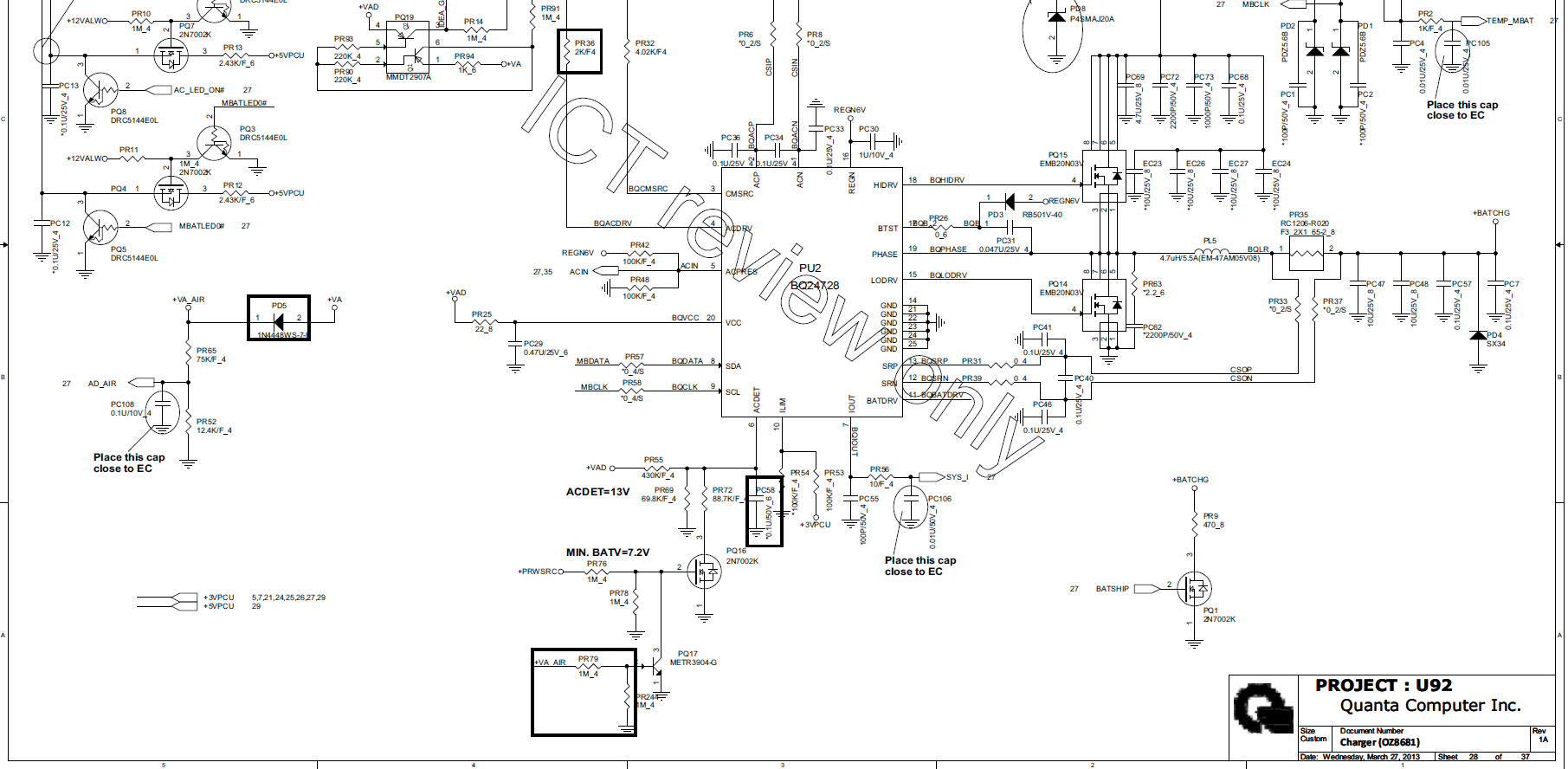
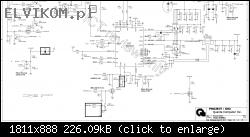
So measured PU2 & PIN6 (ACDET) is only 2.7V...All other voltages on PU2 seems to be OK...
Voltage on PR55 is 19V on one side & 2.7V on the other one...

PU2 (BQ24728) voltages:

PIN1=19V
PIN2=19V
PIN3=19V
PIN4=25V
PIN5=3V
PIN6=2.7V???
PIN7=0V???
PIN8=3.3V
PIN9=3.3V
PIN10=3.3V
PIN11=2.8V
PIN12=2.8V
PIN13=2.8V
PIN14=0V (obviously AS GROUND)
PIN15=0V
PIN16=6V
PIN17=6V
PIN18=2.7V
PIN19=2.7V
PIN20=19V

Also tried to re-flash BIOS SPI & replaced PQ16 & PQ17...

Any help would be appreciated...Thanks
Obrazek

Re: HP 15-n027sa DA0U92MB6D0 not detecting charger / doesn't turn on


przez Google Adsense [BOT] 23 maja 2018, 21:05

#2 Re: HP 15-n027sa DA0U92MB6D0 not detecting charger / doesn't turn on


przez matic 24 maja 2018, 07:34
Hello!

All the voltages on charger chip are ok.
2.7V on pin 6 is correct value.

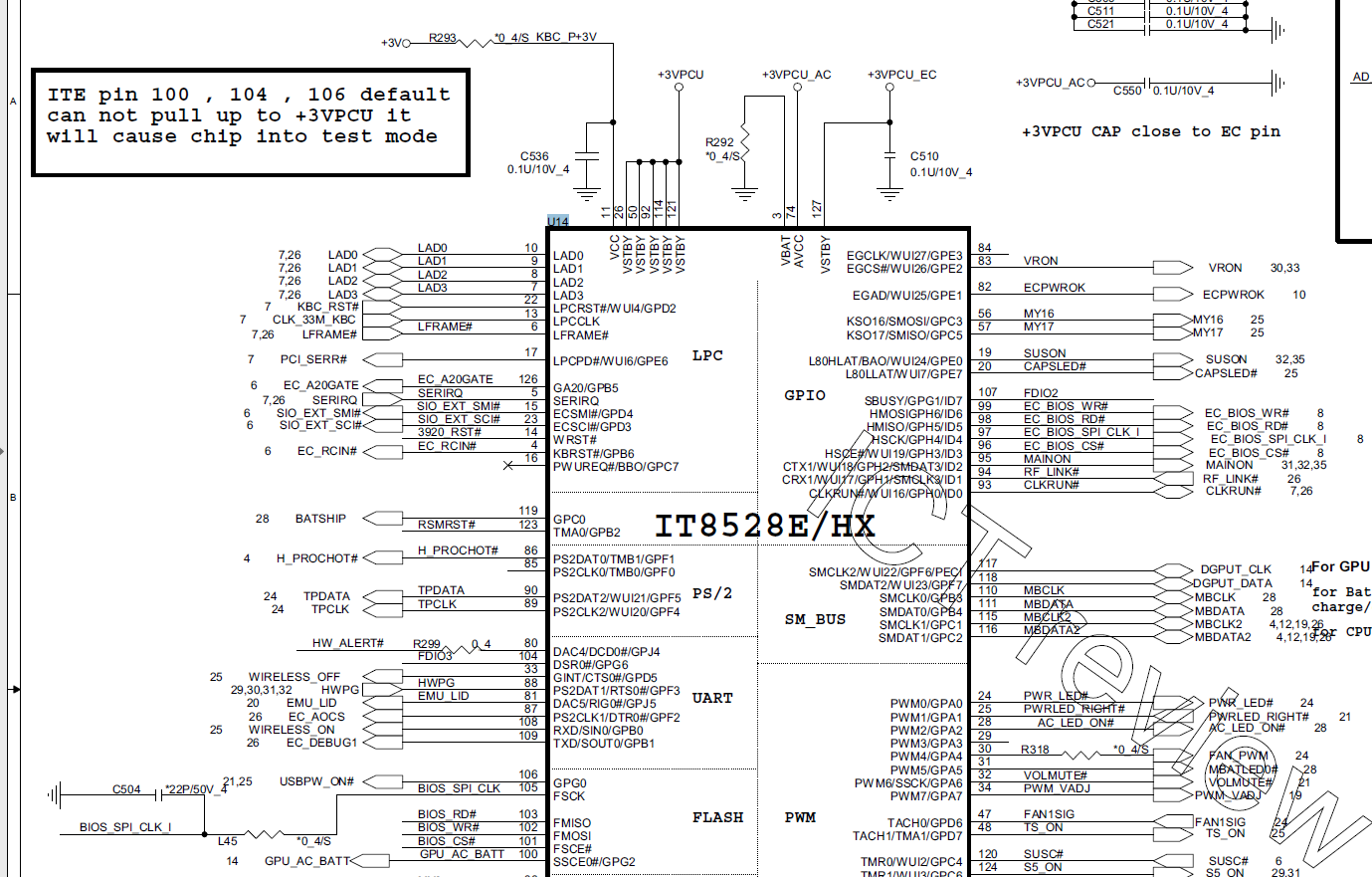
Measure the voltage to ground on pin 71 of KBC chip (U14).

#3 Re: HP 15-n027sa DA0U92MB6D0 not detecting charger / doesn't turn on


przez loser18 24 maja 2018, 13:34
matic napisał(a):Hello!

All the voltages on charger chip are ok.
2.7V on pin 6 is correct value.

Measure the voltage to ground on pin 71 of KBC chip (U14).


Thanks for your reply...

I thought the ACDET voltage is not correct as I couldn't find BQ24728 datasheet anywhere.

KBC Voltages:

PIN71=0.8V???
PIN11=1.8V???
PIN74=3.3V
PIN127=3.3V
PIN26=3.3V(assume all other VSTBY have correct voltage)

Now...I think my problem is with VCC on KBC (PIN11)...There must be something pulling down the voltage on +3V rail...Resistance on PIN11 is about 114KΩ

Obrazek

#4 Re: HP 15-n027sa DA0U92MB6D0 not detecting charger / doesn't turn on


przez yasiu83 24 maja 2018, 14:03
Measure voltage on both pins R293.

#5 Re: HP 15-n027sa DA0U92MB6D0 not detecting charger / doesn't turn on


przez matic 24 maja 2018, 14:17
0.8V on pin 71 of KBC chip is correct value.
loser18 napisał(a):Now...I think my problem is with VCC on KBC (PIN11)...There must be something pulling down the voltage on +3V rail...Resistance on PIN11 is about 114KΩ
"+3V" is a suspend power rail, where the voltage should appears after pressing to the power button.

Measure the voltage to ground on pin 12 of KBC chip.
Measure the voltages to ground on coils PL21 and PL22.
Measure the voltages to ground on pins 2 and 3 of PU6 before and after pressing to the power button.

#6 Re: HP 15-n027sa DA0U92MB6D0 not detecting charger / doesn't turn on


przez loser18 24 maja 2018, 14:48
I was giving you wrong voltage of PIN 11 on KBC...I was reading PIN12 instead...Just checked it under microscope...Really sorry about that...

KBC:

PIN11=0V
PIN12=1.8V

PU6:

PIN2=0V
PIN3=0V

Both before & after pressing power button

PL21=0V
PL22=0V

#7 Re: HP 15-n027sa DA0U92MB6D0 not detecting charger / doesn't turn on


przez matic 24 maja 2018, 15:06
Measure the voltages to ground on pins 35, 120, 123 of KBC chip in the following cases:
a) Before pressing to the power button.
b) After pressing to the power button.

Measure the voltages to ground on pins 79, 125 of KBC chip in the following cases:
c) Power button released.
d) Power button pressed.

#8 Re: HP 15-n027sa DA0U92MB6D0 not detecting charger / doesn't turn on


przez loser18 24 maja 2018, 15:28
matic napisał(a):Measure the voltages to ground on pins 35, 120, 123 of KBC chip in the following cases:
a) Before pressing to the power button.
b) After pressing to the power button.

Measure the voltages to ground on pins 79, 125 of KBC chip in the following cases:
c) Power button released.
d) Power button pressed.


PIN35=0V
PIN120=0V
PIN123=0V

PIN79=0V
PIN125=3.3V & goes low when power button pressed

#10 Re: HP 15-n027sa DA0U92MB6D0 not detecting charger / doesn't turn on


przez loser18 24 maja 2018, 16:11
Machine napisał(a):Replace the bios and remember to save the old one.
If it does not fix replace the KBC.


I've re-flashed & even replaced SPI twice...

#11 Re: HP 15-n027sa DA0U92MB6D0 not detecting charger / doesn't turn on


przez matic 24 maja 2018, 18:01
Replace the KBC chip.

#12 Re: HP 15-n027sa DA0U92MB6D0 not detecting charger / doesn't turn on


przez loser18 24 maja 2018, 20:12
OK...

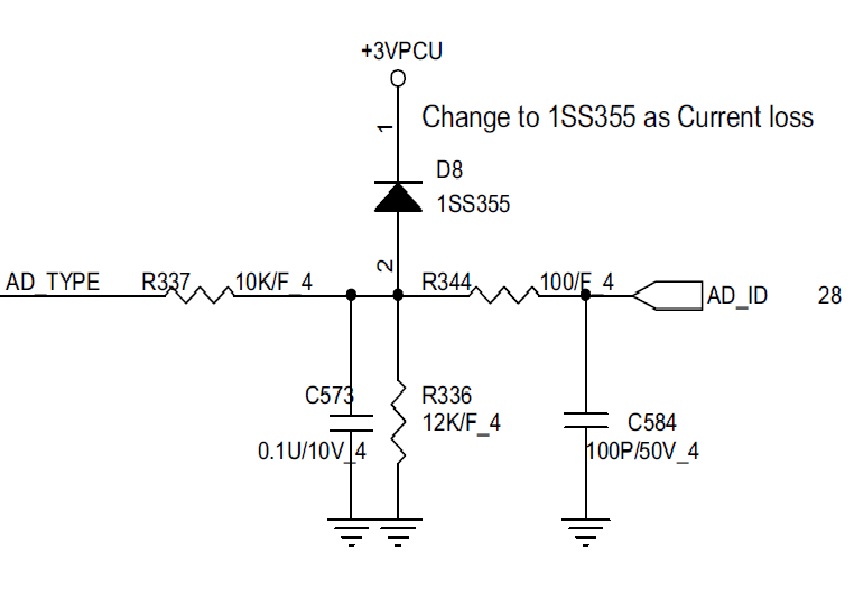
So I've phoned my customer to ask him how did this happen. He said it was caused by faulty adapter (broken cable). I've immediately checked AD_ID & it reads only 1V...Also EC8 was blown, but it's been replaced...Does anyone know if the 1V on AD_ID is correct voltage before I'll replace KBC? I think it should be around 7-8 volts...

#13 Re: HP 15-n027sa DA0U92MB6D0 not detecting charger / doesn't turn on


przez matic 24 maja 2018, 20:24
Correct voltage value on line "AD_TYPE" (pin 71 of KBC chip) is around 0.75V with 90W power adapter.

#14 Re: HP 15-n027sa DA0U92MB6D0 not detecting charger / doesn't turn on


przez gofer 24 maja 2018, 20:28
Check this components:
Obrazek

#15 Re: HP 15-n027sa DA0U92MB6D0 not detecting charger / doesn't turn on


przez loser18 15 czerwca 2018, 00:54
OK guys...

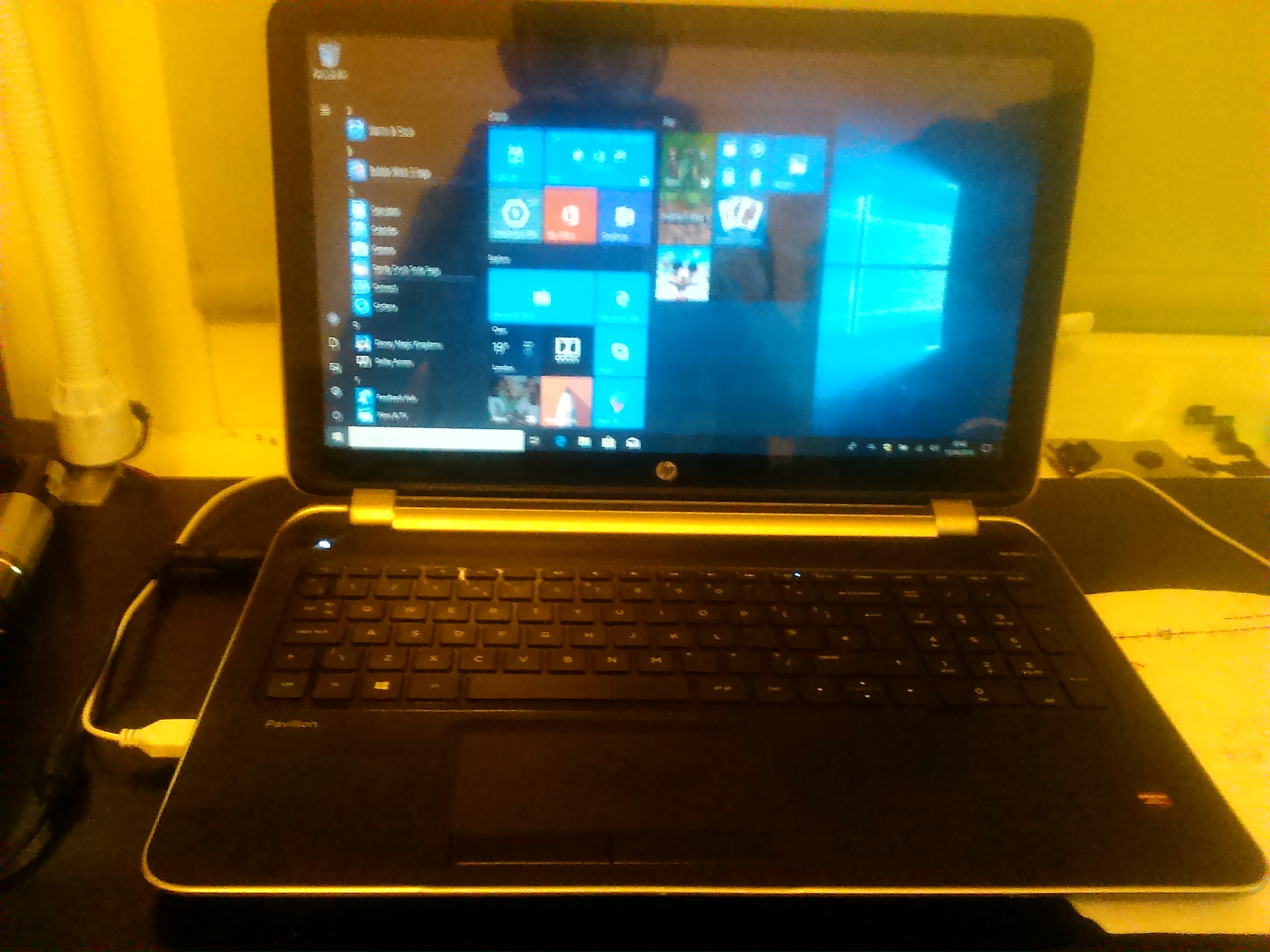
It's been a long time. The laptop is fixed now. I've replaced KBC & everything is working as it should be, however I've had some problems, which I'll explain below.

#1 Heads up:

My original KBC / IO chip was IT8528E EXS . I've ordered AXS & after replacement laptop was completely dead (not even 3 blinks on charging LED). I was never ever thinking the last 3 digits/numbers would make any difference (datasheet also describe them only as a "TRACKING CODE") but after digging some forums I've found out it's actually firmware number as well. Ordered IT8528E EXS & laptop seemed to be completely fixed. So just to let you know, next time you'll be replacing IT8528E or any IT KBC, buy the same "TRACKING CODE"

#2 Heads up:

After the KBC replacement & windows installation everything was working OK except battery charging. When I've started it, BIOS reported straight away the battery needs to be replaced,press enter, blah blah. First I thought my soldering job with KBC was not 100% & MBCLK data is not communicating properly (because I knew battery is OK), however that was not the case. The problem was I've tried another BIOS dumps, but once It's been re-flashed back to my original dump, battery is charging & also reporting OK. So just to let you know again, use your own dump if possible or it may be dependant on DMI information. Not sure.

Obrazek

Anyway...Thanks for all of your help mates...I hope this info will help....

Kto przegląda forum

Użytkownicy przeglądający ten dział: Brak zidentyfikowanych użytkowników i 5 gości

_______________________________
Wszelkie prawa zastrzeżone. Zabrania się kopiowania jakichkolwiek treści i elementów witryny bez zezwolenia.
Wszelkie opublikowane na tej stronie znaki handlowe, nazwy marek, produktów czy usług należą do ich prawnych właścicieli i zostały użyte wyłącznie w celach informacyjnych.